






Operators often need just a few things at the machine: A clear instruction, a simple way to respond, and an easy-to-see indication of what is happening. That sounds simple, but in practice, it can lead to a control panel crowded with push buttons, indicator lights, labels, counters, and other devices. The other option is often a full HMI, which may provide more capability and cost than the application really needs.
The new Banner Engineering S100 Multi-Touch Display gives machine builders and manufacturers another option. It brings touch controls, text prompts, status indication, and operator feedback together in one compact device. In this blog, we will look at the common problem the S100 addresses and the features that make it such an interesting option for point-of-use machine control.
|
Table of Contents (Jump to a Section):
The Problem | Common Workarounds | Meet Banner's S100 Multi-Touch Display | Why the Banner S100 Multi-Touch Display? | Where Could the S100 be Used? | Simplifying Your Work? | Additional Resources

The Problem: Simple Operator Tasks Can Create Complicated Controls
Many machine applications do not require a full graphical interface.
An operator may only need to:
 - Start or confirm a task
- Reset a process
- View a short instruction
- Check machine status
- See a timer, counter, or measurement
- Respond to an alert
The challenge is delivering those functions in a way that is clear, durable, and easy to use.
When each function requires a separate device, a simple operator station can quickly become more complicated than expected. More components can mean more panel space, more wiring, more labels, and more parts to maintain.
Common Alternatives—and Their Downsides
There are several common ways to handle these applications.
A Panel Full of Push Buttons and Indicators
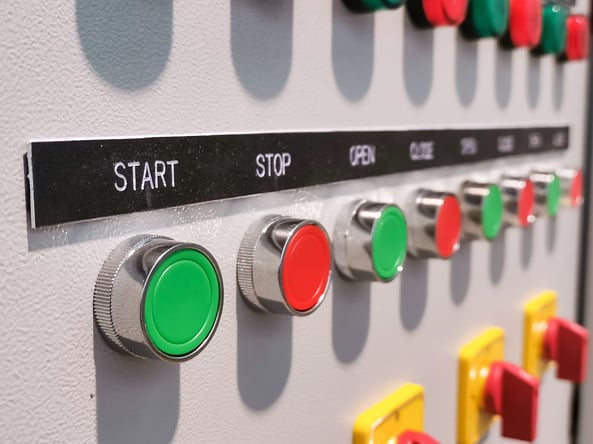
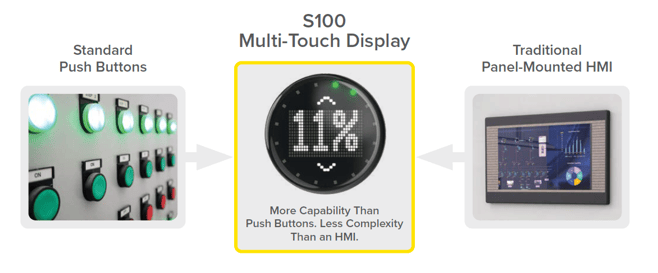
Traditional push buttons and indicator lights are familiar, durable, and easy to understand. However, adding more functions often means adding more devices.
A station may need separate buttons, lights, labels, displays, buzzers, timers, or counters. That can increase installation work and make the operator interface feel crowded.
A Traditional HMI
A full HMI can provide detailed graphics, data, menus, and machine controls. For larger or more complex applications, that may be the right choice.
For a smaller point-of-use task, though, an HMI can bring more cost, programming, and setup work than the application needs. It may also require creating and maintaining a separate interface alongside the PLC program.
Separate Display and Input Devices
Another approach is to combine a small text display with separate buttons and indicators.
This can work, but it still requires multiple devices and connections. It also creates more individual components that may need to be installed, configured, and replaced over the life of the machine.
Meet the Banner S100 Multi-Touch Display
The Banner S100 Multi-Touch Display is a compact operator interface designed for applications that need more than standard push buttons but do not require a full HMI.
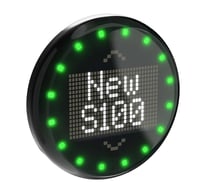
It brings up to five touch zones, a configurable text display, 16 RGB status LEDs, haptic feedback, and audible alerts together in one 100 mm device. This gives operators a clear way to view instructions, check machine status, and respond directly at the point of use.
Available with discrete, IO-Link, or Modbus control, the S100 can support everything from simple repeatable tasks to interfaces that change dynamically with PLC logic. The result is a cleaner, more flexible operator station with fewer separate components to install and maintain.
Why the Banner S100 Stands Out
The S100 brings several operator functions together in one compact device. Instead of installing separate buttons, lights, labels, displays, and buzzers, users can handle many of those needs through one interface.
Touch Controls, Text, and Status in One Device
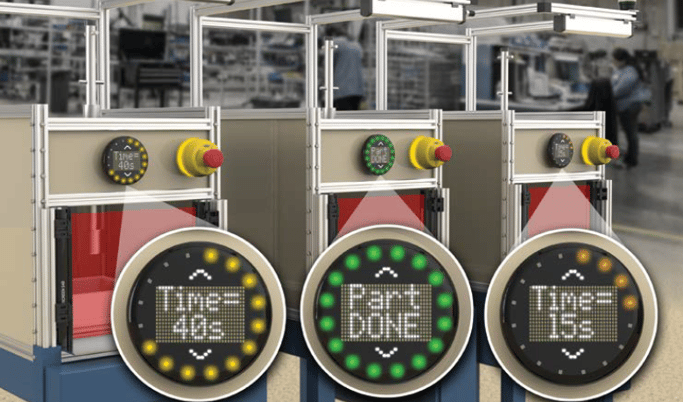
The S100 includes up to five configurable touch zones, a two-line alphanumeric display, and 16 RGB LEDs around the outside. The touch zones can act as separate controls or be combined into one larger zone. The display can show short prompts, measurements, timers, and status messages, while the LED ring can show machine state, progress, warnings, or completion.
This gives operators both the information they need and a clear way to respond at the machine.
Feedback Operators Can See, Feel, and Hear
The S100 provides haptic vibration and audible feedback to confirm a touch or draw attention to a changing condition.
That matters because touch controls do not move like mechanical push buttons. The vibration helps operators know their input was accepted, while the audible alert adds another layer of awareness.
Built-In Modes for Common Tasks
Prepared modes include timer, counter, sequence, measurement, and pick-to-light functions.
These built-in options can reduce setup time for common applications and make it easier to repeat the same configuration across several stations.
Discrete, IO-Link, and Modbus Options

The S100 is available in discrete, IO-Link, and Modbus models.
The discrete version can be configured with Banner’s free Pro Editor software. IO-Link and Modbus models allow the PLC to update the display text, touch functions, LED indication, and audible alerts as machine conditions change.
This gives users a simpler option for repeatable tasks and more connected options for applications tied closely to PLC logic.
IP69K - Designed for Industrial Use
The S100 uses a compact 100 mm polycarbonate housing and carries an IP69K environmental rating. It is designed for point-of-use mounting on machines, workstations, conveyors, and assembly cells.
Its rugged construction helps make it suitable for demanding industrial and washdown environments.
Where Could the S100 Be Used?
The S100 can support many point-of-use applications where operators need clear information and a simple way to respond.
Robotic Assembly Cells
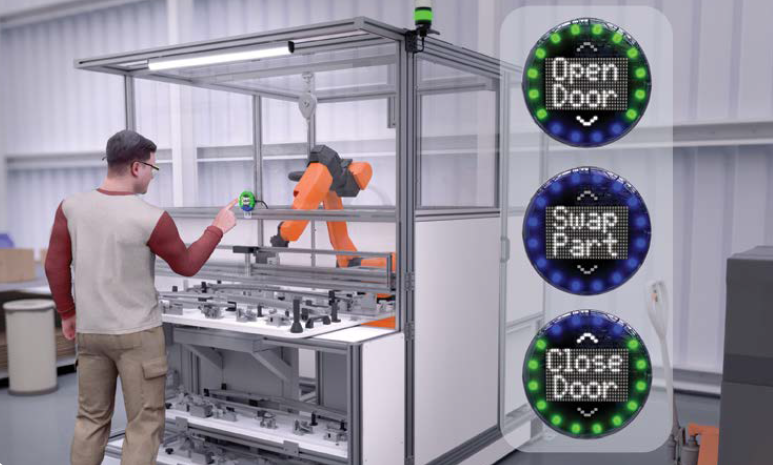
The S100 can display messages such as “Assembling,” “Open Door,” or “Swap Part” while giving the operator a clear way to confirm the next step. The PLC can update the display and LED ring through IO-Link, while haptic feedback confirms the operator’s touch.
Automated Assembly Stations
A discrete S100 can be placed on each assembly cell to provide consistent instructions, timing, status indication, and input confirmation. A configuration can be created once in Pro Editor and loaded across multiple devices.
Conveyor and Motor Monitoring
A Modbus S100 can show current, temperature, or vibration information near the motor or conveyor being monitored. The LED ring can indicate the relative condition, while touch zones provide a reset input back to the PLC.
Other possible uses include machine changeovers, production counters, quality checks, material calls, part confirmation, pick-to-light stations, and local maintenance controls.
A Small Device That Can Simplify a Lot
The most interesting thing about the S100 is not any one individual feature. It is how those features work together.
Touch controls, text instructions, status lights, timers, alerts, and operator confirmation can all be handled through one compact interface. That can help reduce panel clutter, simplify repeated machine designs, and give operators clearer information at the exact point where they need it.
For applications that need more than a push button but less than a full HMI, the S100 may be a very practical fit.
Airline Hydraulics can help you compare S100 models, review communication options, and determine whether the device is a good fit for your machine or operator station. As a Banner Engineering distributor, we can support product selection
Additional Resources
Explore Banner S100 Pricing & Availability
Read More about Banner Engineering S100



Leave Comment